You started with Google Maps because it was free and familiar. For five or six stops, it was fine. But now you are running 30, 40, maybe 80 deliveries a day and the cracks are impossible to ignore.
Google Maps is a navigation tool. It gets you from here to there. But route planning for delivery operations is a logistics problem, and those are two completely different things.
Where Google Maps Hits the Wall
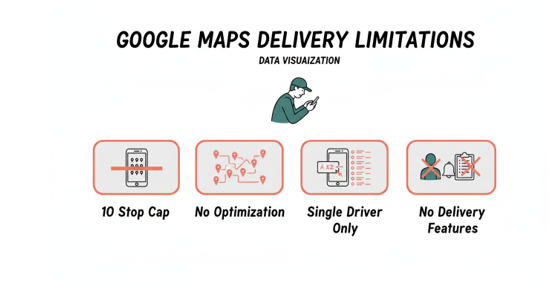
You already know most of these. But seeing them listed out makes the cost clearer.
Ten-stop cap on mobile. Your driver has 30 deliveries. That means building three separate routes and hoping they connect efficiently. They usually do not.
No route optimization. Google Maps routes stops in the order you enter them. It does not rearrange them to minimize drive time. You end up dragging pins around the map, guessing at the best sequence.
No bulk import. Every address gets typed or pasted one at a time. Fifty stops in a spreadsheet means fifty copy-paste cycles before anyone leaves the lot.
Single driver only. There is no way to split stops across your team, balance workloads, or assign zones. You plan one route at a time and repeat the process for every driver.
No delivery features. Time windows, proof of delivery, customer notifications — none of it exists. You fill those gaps with texts and phone calls.
For a solo driver making a handful of stops, none of this matters. The moment your operation outgrows that, every one of these gaps costs you time and money daily.
What to Look for in a Delivery Route Planner
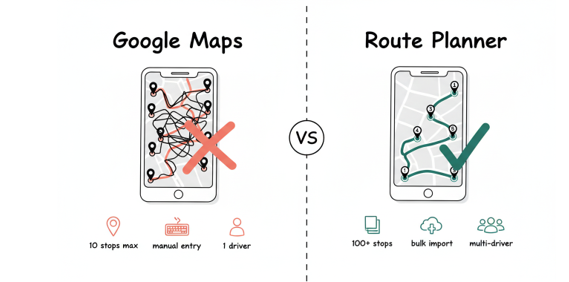
The right tool should eliminate every limitation above in a single workflow. Here is the checklist.
Handles 100+ stops per route. You should never have to split a driver’s workload across multiple route plans because the tool ran out of capacity.
Optimizes stop order automatically. Upload your addresses and get them sequenced by the fastest driving order. No dragging, no guessing. A dedicated route planner does in seconds what takes you 30 minutes by hand.
Imports addresses in bulk. CSV or Excel upload. Paste your spreadsheet and go. If you are still entering addresses one at a time, the tool is the bottleneck.
Splits stops across multiple drivers. Feed in your full stop list, set driver count, and get balanced routes grouped by zone. No manual sorting required.
Supports time windows and constraints. Some deliveries must arrive by noon. Others are flexible. The tool should reorder stops while respecting those windows automatically.
Exports routes to drivers instantly. Download as CSV, share a link, or push to a driver app. Your drivers still navigate with Google Maps or Waze for turn-by-turn — they just follow a smarter sequence.
Making the Switch Without Disrupting Your Day
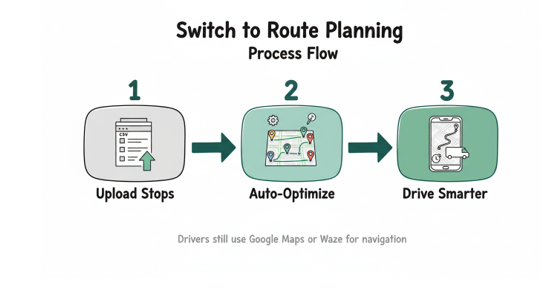
You do not have to abandon Google Maps. Most route planner tools hand off turn-by-turn directions to the maps app your drivers already use. The shift is only in how you plan.
Start with your busiest route tomorrow. Upload the stops, let the tool optimize, and compare the result to what you would have built by hand. Track total miles and total time.
The gap is usually 20 to 30 percent. That is fuel, that is overtime, that is drivers finishing an hour earlier. Multiply that across a five-day week and the savings are hard to ignore.
The Real Cost of Sticking With Google Maps
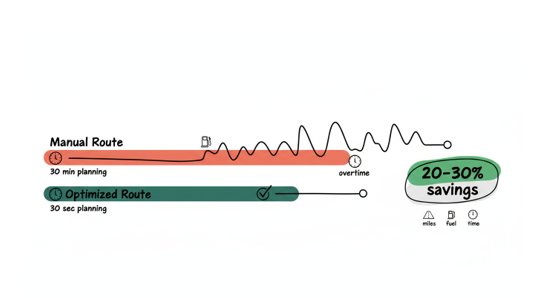
Every day you spend 30 minutes manually sorting stops is a day your competitors spend 30 seconds. Every route your drivers run in the order you entered instead of the optimal order burns fuel you did not need to burn.
Google Maps is great at what it was built for. Route planning for delivery teams is not what it was built for. The sooner you use the right tool for the job, the sooner you stop leaving money on the road.